
Developers should add a section to this page when they document a completed task. Ivan or Madrigal or whoever will clean up the text before copying it to the release notes.
Reply-To when sending mails from a form action
The form action "Send as mail" has been updated so that the mail is sent with the Reply-To field containing the name and email of the user who filled in the form.
Rename the "Go back" button for tasks
The "Go back" button on the task details page has been renamed in some circumstances, so that it is called "To search" if it leads to the task search page.
Extend the 'Send as mail' form action
The 'Send as mail' form action has been extended with an option to send an email to the email adresse of the user / company / person that the form is completed on.
Deleting support ticket tags
When deleting a support ticket tag, the tag is now simply hidden, so that existing tickets that use the tag will still show the tag, but the tag will not be selectable in new tickets.
Service agreement filter when searching for equipment
The "Service agreement" filter in the equipment search behaved in a unintuitive way. This has been fixed.
Delete existing icon
It is now possible to remove the existing icon/picture for a company, user, person, product, equipment and equipment type.
If a picture exists then a "Delete existing picture" checkbox will appear when editing the company / user / whatever.

Selecting team in planning module
When you selected a team for the task list in the planning module, it also affected which team were selected in the planning, but only after reload of the page.
This has been changed so that selecting a team in the task list does not affect the choice of team for planning.
More task fields on the extranet
Previously Microbizz limited which task fields could be shown on the extranet when using layout. This limitation has been removed.
Reports for exporting to Zenegy
3 new reports have been developed, for exporting data to the Zenegy system. The reports are named R35, R36, R37.
Set company integration from form action
The "Update existing company" form action can now be used to select the integration for the company. This is done the usual way, by selecting which form question should be used to specify the integration.
"Save for all users" on tables
We have made minor changes to the "Save for all users" button in the column selector for the tables. This also affects the grouping.

The "Save for all users" button will now override the settings made by the individual user. Any user who wants another setup will then have to select columns again.
We have also made it possible for the individual user to select to have no grouping. Previously this meant that the user would revert to the standard grouping.
Update filters can be used with quotations
You may now create update filters for quotations. This is done in the Settings module. The filters themselves are used in the Sales module, either on the details page for a quotation, or on the search page for quotations, when you may select one or more quotations and then use the new "Change" button to apply an update filter.
Update filters and "multi check" custom fields
The update filters can now update the individual options in a multi check custom field.
Customer number restrictions
In the CRM module settings you may now specify a "regular expression" which is used to validate the customer number. This validation only takes place when the company is edited in MB, not when companies are imported or updated in any oter way.
The regular expressions use the PHP syntax: https://www.php.net/manual/en/function.preg-match.php#105924
Examples
Exactly 8 digits: /^[0-9]{8}?$/
Between 6 and 8 digits: /^[0-9]{6,10}?$/
Starts with "P" followed by 4 or 5 digits: /^P[0-9]{4,5}?$/
New option to attach tool when importing tasks using import filters.

A new field "Tool to attach" allows the user to include either the remote ID or Microbizz ID of a tool and then having this (existing) tool attached to the task being imported.
In the example above, a value of 19 in column B will result on the equipment with ID=19 being attached to the task being imported.
Get teams by filter in report module
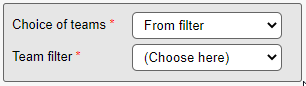
When selecting teams as report input, it is now also possible to choose the teams from a team filter.
Import of equipment
When setting up an import filter for equipment it is now possible to specify that the responsible for the equipment should not be updated.
File sync data verification
We've added a tool for comparing the files on the file server with the files in Microbizz. This is unlikely to be useful for anyone but Ventu's support department. It requires the latest file sync client (from october 2020).
Economic integration: Get department from user

When using the department option in Economic, it is now possible to set a department for each user. This is done by either using an existing field or creating a new custom field for the purpose. The field is then selected in the "Custom field for department" section when setting up your Economic integration. You need to check "Use department" to make the field visible.
This will work from invoice lines originating or attached to a task, where the department number will be taken from the user responsible for the task.
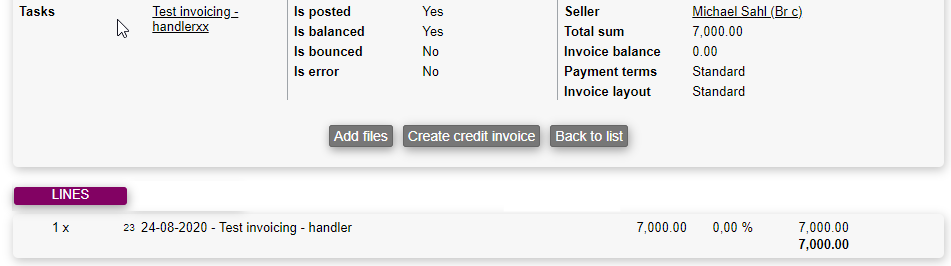
View invoice lines after invoice is posted
It is now possible to see the invoice lines of a given invoice, after the invoice is posted.
Create task from equipment
When creating a task from an equipment, using a task template which contains product use, the product use will now attached to the equipment.
Fill in form without login
It is possible to fill in forms without being logged in to Microbizz. Some customers have complained that this is being used by spammers, so we have added a simple "captcha" to prevent this: When someone fills in the form they are asked to add two small numbers to prove that they are not a robot.
Answerdate on form answers
We have made some changes to how the answered date/time on form answers is updated when editing a form answer and when using "Save for later".
Planning for user without the required competences
When planning for a user, either in the PLANNING tab on a task, or from the Plan route menu on the task search page, you are now given a warning if the user doesn't have the competences required for the task.
Limited Sales module
If you only have the limited Sales module, you will now be able to to create product filters, and product units, and product custom fields.
Access to file sync
There is no longer free access to the file synchonization setup, it needs to be enabled by Microbizz. Please contact the support department if you are using the file sync feature, but don't have access.