
Take a look at what we've been building for the last few months 🙂
Quotation+ Beta
-
We have expanded the HTML editor, so its now possible to insert a table in the description, which will also be inserted in the PDF
-
When copying a quotation, you now get navigated to the copy, and we have implemented an loading screen, to indicate the copy is in progress
-
When creating an quotation, the seller, and team is now automatically inserted from the users default team. This will be overwritten if you choose an template
-
We have now implemented permissions on quotation types and templates on a team level, so they can be restricted
-
We have added a new form action that can update new + modules. Start by activating “New objects” through the Access tab on the specific form.
-
We have expanded the settings for Quotation+, so you now can choose to always copy the PDF from the quotation to the task when marking it as won, and define the folder name it should be placed in. The folder will automatically get created if it does not exist already.
-
Its now possible to set VAT on a quotation. As default, it will be fetched from the quotation's company
-
Its now possible to insert todays date in the filename in the PDF that is generated. This is configured under settings for Quotation+
-
Its now possible to group by Type and Status for quotations on the start page
-
Its now possible to use Global search to search for quotations
-
When marking a quotation as won, you can now choose if it should be previous revision or the current
-
We have made changes how the price is transfered from a quotation to a task:
-
If we create a task, we can select a task template. Depending of the invoice policy on this template, the following happens:
-
If the task is invoiced by hours / product use then all the quotation lines is transferred to the task as product use.
-
If the task have a fixed price, then the quotation total price is transferred to the task as the fixed price.
-
-
-
Its now possible to use custom fields from the user module in documents in Data+
-
Its now possible to group your searches in Quotation+, so that they can be listed by status or type
-
It is now possible to configure who have access to different quotation types. A user can only access a quotation if the user is part of a team with access to that quotation type.
Per default, all teams can access all quotation types.
-
You can now insert a quotation funnel on the start page, to see a overview of your quotations in a % view
-
You can now search for quotations through the global search to the left of your user name
-
When configuring how the quotations PDF file should be named, you can now include todays date
-
All quotations now have a weighted total which is the quotation total sum x the weighted percentage, which is set up on the individual quotation status
-
It is now possible to copy the quotation PDF to the created task when winning a quotation, this should be first configured under settings for the Quotation+ module

-
We now respect line breaks in text lines when inserted into a quotation PDF
-
You can now create an e-mail template when sending quotations. Start by sending an e-mail, which will open the new dialogue. From here, you can now directly create a dynamic template and either send the e-mail directly or save the new e-mail template
-
It is now possible to use the field “Line sum (incl. VAT)” in Data+ documents to generate the line sum with VAT
CRM+
-
We have introduced a new integration to the provider Eniro so you can fill in customer addresses just by entering a phone number
Planning+
-
We have adjusted the colors of planning, to make them brighter and to give them a better contrast
-
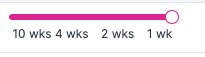
We have added a tooltip when using the slider, to better get a understanding of which view you are choosing:
-
When a user have multiple plannings in Stacked view, we now keep the user name in the top to get a better view, instead of putting it in the middle
-
Appointments in the past now have a grey color, to indicate they are in the past
-
When dragging a task to plan, we now show users which do not have the right competences with a grey color, to indicate they do not have the right competences to complete the task
-
In stacked view, we have changed the logic when planning through the clock slider, so that the earliest times is in the top instead of in the bottom
-
In the tooltip for plannings, we now show the timings of the planning, instead of the module name
Data+
-
It is now possible to apply number series to products
-
It is now possible to adjust the Reply-to field in the e-mail that we send, so customers can answer directly to the e-mail address. This can be set up in the settings for Data+ , but also in the System module → Mails
-
General
-
We have removed the setting “Limit which objects should be available in the app” as we no longer support the feature.
-
Navigation: We have made major improvements to the overall navigation and look and feel of the new Microbizz UI.
-
You can now bookmark pages you use often, by clicking the bookmark icon in the module list
-
We have implemented breadcrumbs in top of all modules, so you can easily see where you are, and also click back to where you came from
-
We have moved the notification icon from the bottom to the top
-
-
It is now possible to use tables in our WYSIWYG editor
-
In new
modules, it is now possible to choose “Is active user/person” in filters, to create more dynamic filters
-
It is now possible to add competences as a field in the tooltip, in new
-
When using the new UI for other than
-
When configuring filters in new